
Documentation / HTTP API
HTTP API
Create REST API tools that your AI agent can invoke during conversations to integrate with external systems.
HTTP API tools let your agent call REST endpoints during a conversation based on the agent prompt and tool definition.
What is an HTTP API Tool?
An HTTP API Tool is a REST API definition that the LLM can invoke at runtime.
Typical use cases:
- Call your own backend endpoints
- Trigger n8n automations
- Sync data with a CRM
- Fetch data from external APIs (weather, pricing, availability, etc.)
- Write/update/read data using Rest API
The LLM decides:
- which tool to call
- when to call it
- what parameters to send
All based on:
- Your prompts: agent instructions in simple english (or any language)
- Tool name
- Tool description
- Parameter definitions
Defining an HTTP API Tool
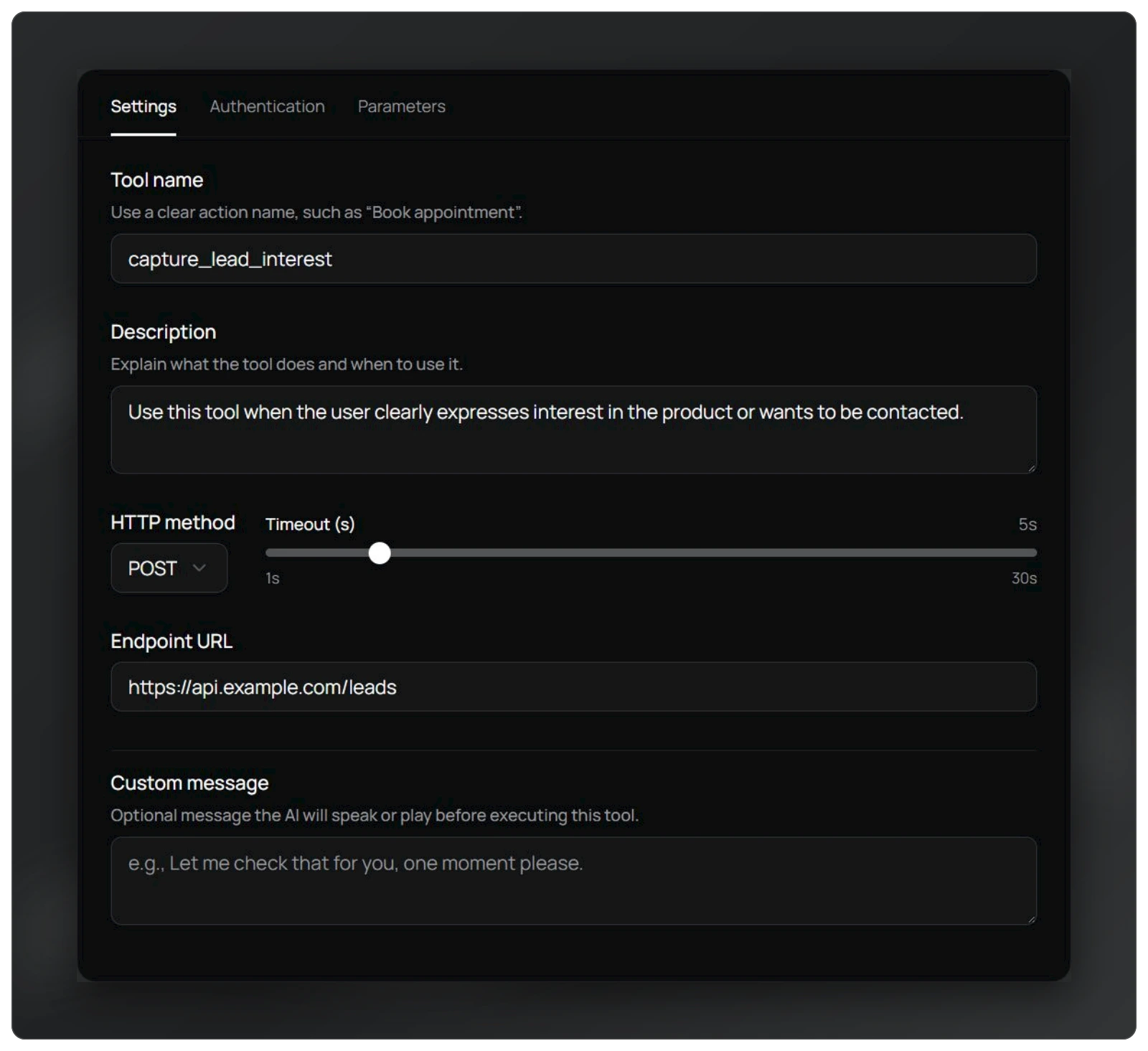
1. Tool Name
-
Must be clear and action-oriented.
-
Examples:
capture_lead_interest,fetch_weather, 'create_crm_contact', etc
2. Tool Description
- Extremely important
- This is how the LLM decides when to use the tool.
- Write it in plain, explicit English.
Bad: "API to capture data"
Good: "This tool is to capture interest. Use this tool when the user clearly expresses interest in the product or wants to be contacted"
3. Endpoint Configuration
- Full URL (must include
http://orhttps://) - Supports REST methods
Note
Common mistake: forgetting https:// in the URL.
4. Authentication & Headers
- Add custom authentication
- Add custom headers
- Works with internal services and third-party APIs
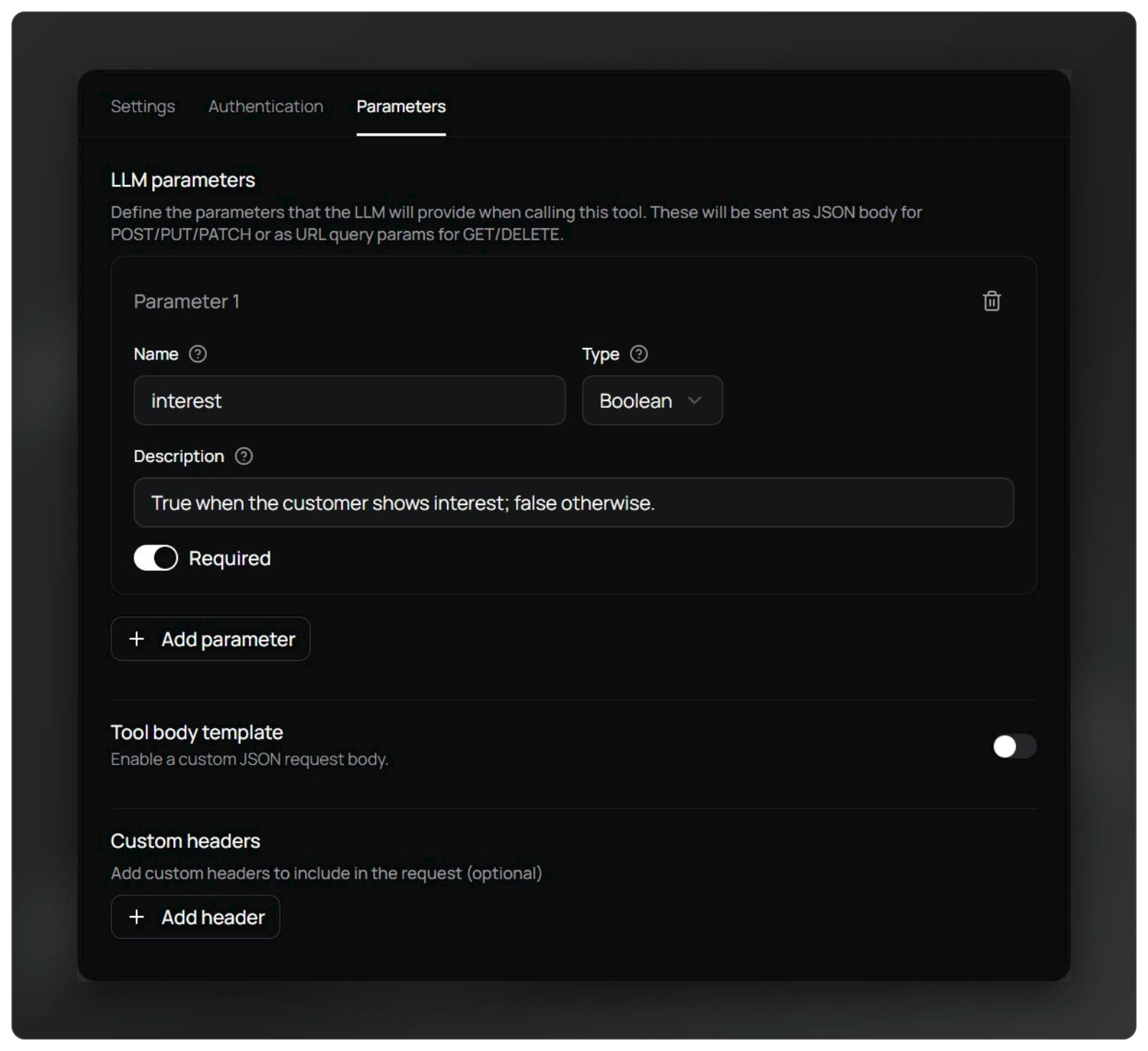
5. Parameters
Each parameter must have:
- Name
- Type
- Description
- Required/Optional flag
Parameter descriptions matter more than types.
Guidelines:
- Start with string parameters when possible
- Be explicit in what the value represents
- Mark only truly mandatory fields as required
Example:
- interest (boolean): "Set to true if the user clearly shows intent to buy or wants follow-up. Otherwise false."
Attaching Tools to the Agent
- You can attach multiple tools to the agent
- All the tools that you have created will be available for selection in the agent settings
- Tools are only callable when attached to the agent
- The LLM will choose which one to call
In the agent prompt, guide the LLM using simple English instructions.
Example:
"If the user shows interest in speaking to sales or wants a callback, immediately call the capture_lead_interest tool and set interest to true." This instruction is often the deciding factor for correct tool usage.
This instruction is often the deciding factor for correct tool usage.

Tool Invocation Logic (How the LLM Thinks)
The LLM considers:
- User's spoken intent
- Agent prompt instructions
- Tool name and description
- Parameter descriptions
If these align clearly, the tool is called automatically.
Poor naming or vague descriptions lead to:
- Missed tool calls
- Wrong parameters
- Hallucinated values
Key Best Practices
- Name tools clearly
- Write detailed, action-based descriptions
- Keep parameters simple at first
- Always include http/https in URLs
- Use plain English in agent instructions
- Attach only relevant tools to the agent
Well-defined tools + clear prompts = reliable, production-grade voice agents.
Verify the configured tool
Attach the tool to the agent and test a question requiring it. Check that parameter names and types match the endpoint and that the agent explains the received result.
| Failure | What to review |
|---|---|
| 401 or 403 | Credential and external-service permission |
| Timeout | Endpoint availability and response time |
| Incorrect parameter | Name, type, required state and field description |
| Tool not called | Step attachment and instructions for when to use it |
Use test credentials and endpoints for actions that change data. Describe error handling in the instructions; do not announce a completed update without service confirmation.
In-conversation tool or post-call webhook?
HTTP API looks up data or performs an action when the agent needs it during a conversation. A post-call webhook sends result data to your system. Choose by task timing, not only because both use HTTP.